
Build forms. Automate what happens next.
UndaForms is where your team builds multi-page forms, works through every submission, and turns each one into action — a status, an owner, an email, a Slack message, a spreadsheet row. AI helps draft and improve both, and changes nothing until you apply it.
No credit card requiredFree plan includes 3 active forms
Your details
Build
A form builder for real applications, not just contact forms
Build multi-page forms with branching, calculations and signatures — and see exactly what respondents will see as you go.
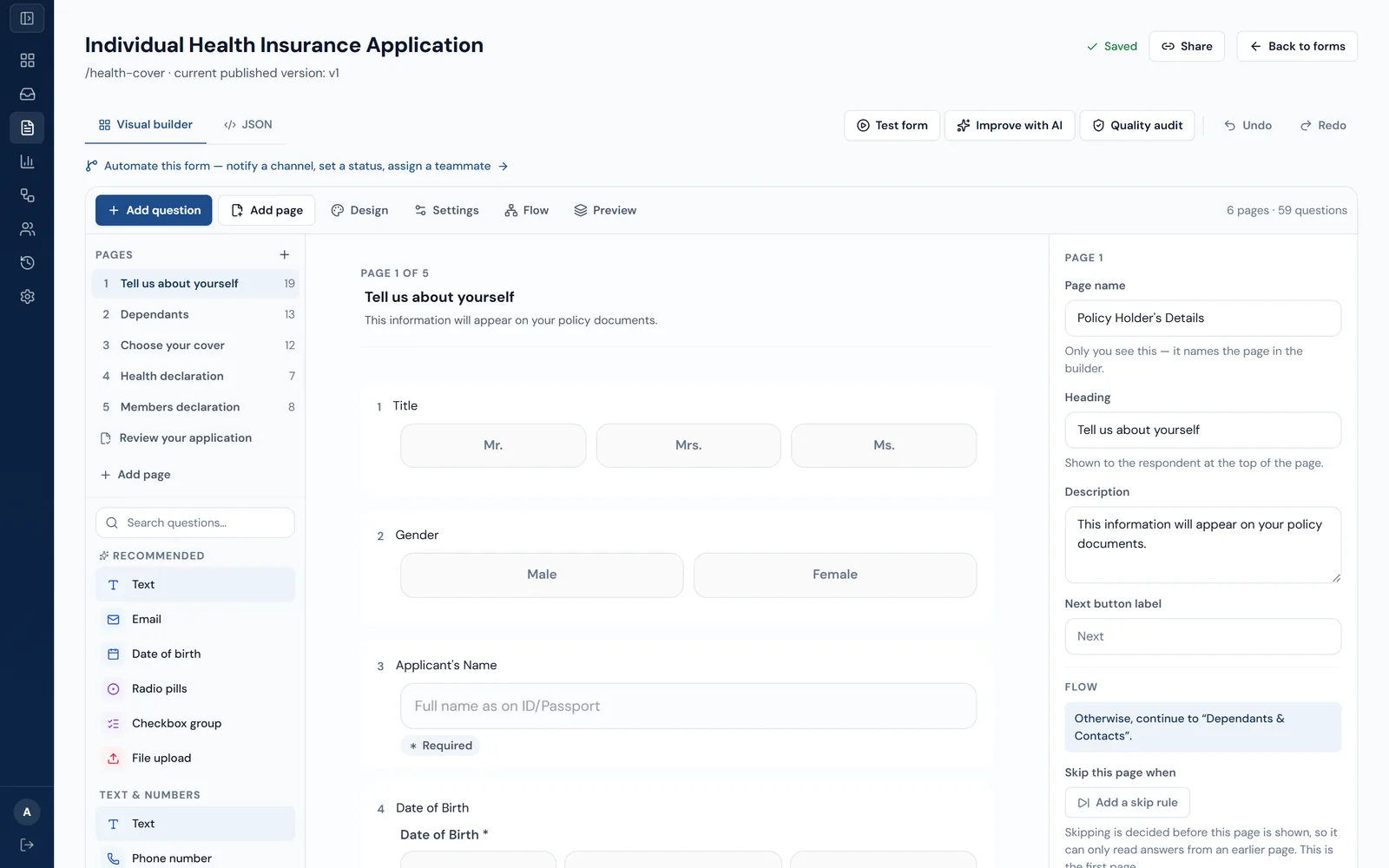
- 26 question types, from text and dropdowns to file uploads, typed or drawn signatures, repeatable groups, line items and calculated totals.
- Multi-page forms, or one question at a time — with a live desktop and mobile preview.
- Conditional logic: show or hide questions, skip pages, and end a form early when an answer rules someone out.
- Calculated totals are recomputed on the server when a form is submitted, not trusted from the browser.
- Autosave with undo and redo, plus a quality check before you publish.
- Start from 37 ready-made templates across 11 categories, or from a blank page.
Custom form branding is included on Growth and above.
Improve with AI
AI that proposes changes. You decide what happens.
Describe what you want in plain language. UndaForms turns it into specific, reviewable changes to your form or workflow — and applies nothing until you choose to.
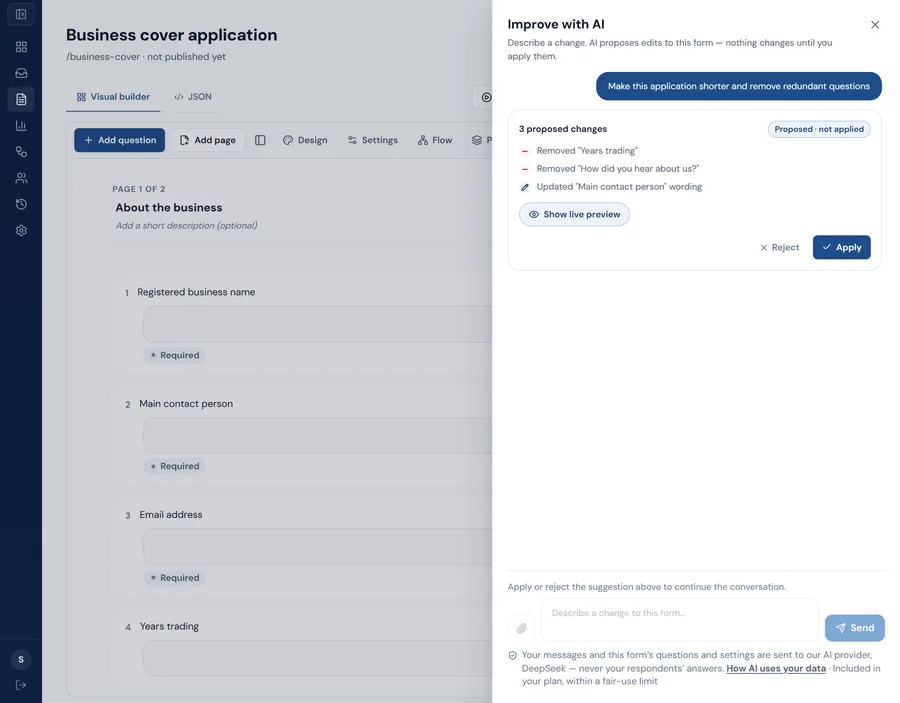
Draft with AI
- When
- A submission is received
- Then
- 1. Send an email to the operations team
- 2. Add a row to Google Sheets
Illustration of workflow drafting. Drafts use the connections your organization has already set up, and nothing is saved or switched on until you do it in the builder.
Draft a form
Describe the form you need, or upload an existing PDF, and get a structured draft to review in the builder.
Improve it in conversation
Ask for a shorter form, clearer wording or a better structure. Each suggestion lists exactly what would change.
Draft a workflow
Say what should happen after a submission and get a When / Then workflow built from your own forms and connections.
Edit a workflow in conversation
Add a step, change a condition or reorder actions by asking — reviewed before anything is saved.
Audit quality
Instant checks on forms and workflows, with an optional AI review that points to what to fix.
Nothing changes on its own
Suggestions are checked against the same rules as a manual edit. AI cannot publish a form or activate a workflow.
AI form drafting, improvement and quality checks are on every plan. AI for workflows needs workflow automation, on Growth and above. AI requests are rate-limited per organization.
Share this form
Public form link
https://forms.undaforms.com/f/8xk2p9nq
Embed on your site
<iframe src="https://forms.undaforms.com/f/8xk2p9nq?embed=1"
  width="100%" height="720" title="Business cover enquiry"></iframe>
Publish
Publish once. Collect from anywhere.
Respondents don't need an account. Send a short link, print a QR code, or embed the form on your own website.
- Forms adapt to phones, tablets and desktops, including inside an embed.
- Progress is saved on the respondent's device, so they can come back and finish later in the same browser.
- If the connection drops at submit, the submission is kept on the device and sent when it's back.
- Optional email verification with a one-time code, and typed or drawn signatures.
- Every submission records the version of the form it was answered on.
Agent links
Turn your team into a distribution network
Give each agent their own form link and see every submission they bring in — whether they share it on WhatsApp, by SMS, in an email or on a printed QR code.
- Every agent gets their own link and QR code for each live form. They don't need an account to share it.
- Each submission through an agent's link is credited to them automatically. It's credited only if the agent belongs to your organization and is active — never to another organization's agent.
- See each agent's submissions, what's pending review and the last 30 days, then open them in the inbox or export them.
- Agents who sign in see their own links and only the submissions credited to them.
- Deactivate an agent and their links still open the form, but stop crediting them.
Agent links are available on Growth and above.
Collect & operate
Every submission has a status, an owner and a history
Submissions land in a shared workspace where your team reviews, assigns and moves them forward — not in an inbox or a spreadsheet export.
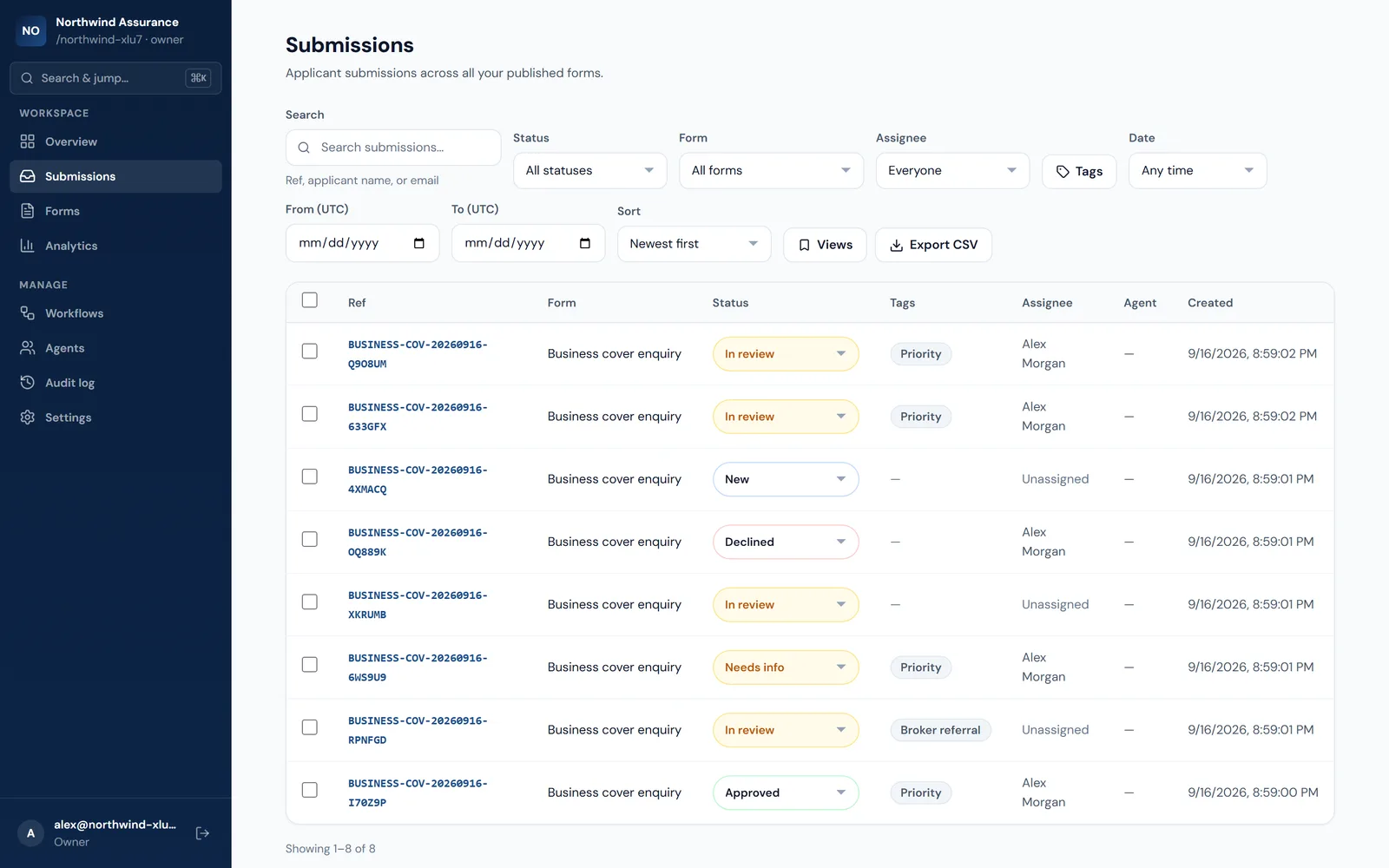
- Track each submission through New, In review, Needs info, Approved and Declined.
- Assign a teammate, add tags, and leave internal notes that respondents never see.
- Search by reference, name or email, and filter by status, form, assignee, tags and date.
- Save the views you use every day, and update many submissions at once with bulk actions.
- An activity history on every submission shows who changed what, and when.
- Export to CSV whenever you need the data somewhere else.
- Ask for a payment when a form is submitted — by M-PESA or card, paid straight to your organization's own Paystack account.
- A payment counts once Paystack confirms it. Every try, what Paystack reported and any refund sit beside the submission, and a confirmed payment can start a workflow.
Form performance analytics, agent referral tracking, the audit log and payments on forms are on Growth and above; payments need your own Paystack account. CSV export row limits depend on your plan.
Automate
Decide what happens after every submission — once
Workflows react to submissions for you. When something happens and it matches your conditions, UndaForms takes the next step and records exactly what it did.
When
- A submission is received
- A submission’s status changes
- A tag is added to a submission
- On a recurring schedule
If
- Status, form or tag
- Assignee or referring agent
- The answer to a specific question
Then
- Set a status, assign a teammate, add a tag
- Wait for a period, or until a date
- Send an email
- Post to Slack or add a Google Sheets row
- Call a webhook or HTTP endpoint
- Send a WhatsApp template message
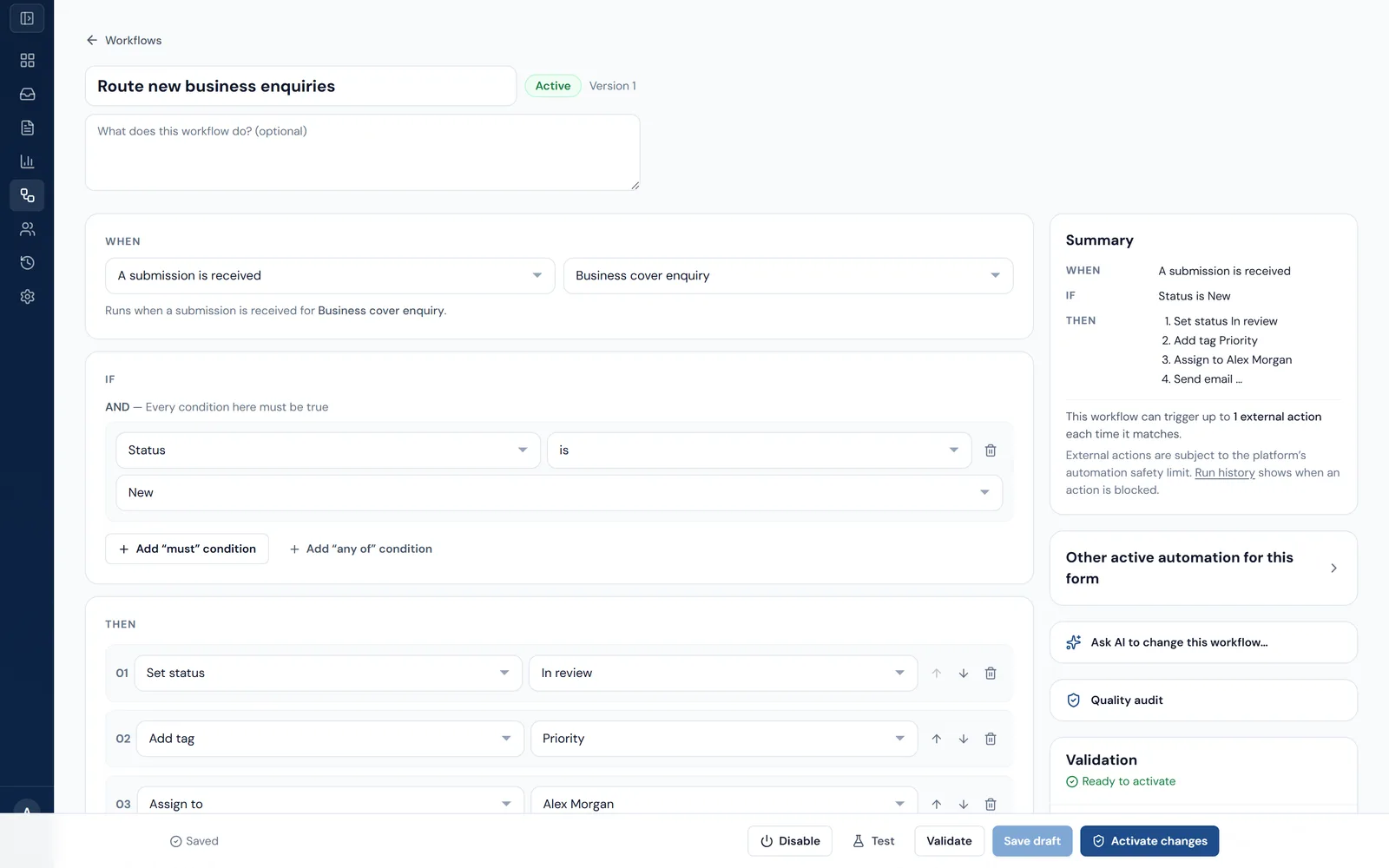
- Test a workflow against a real submission before switching it on. The test shows what would happen and changes nothing.
- Workflows are validated before they can be activated, and edits don't affect runs already under way.
- Run history shows what each run saw, which conditions matched and what every action did.
- Outbound deliveries are queued, retried and tracked individually.
- A safety limit caps how many external actions a single submission can set off.
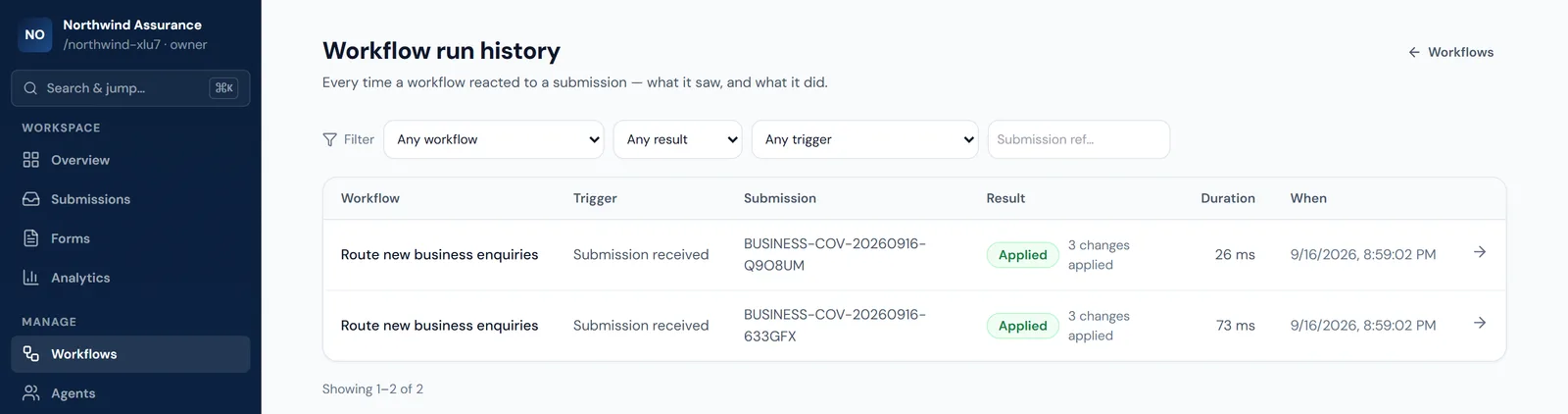
Workflow automation, including email actions, is on Growth and above. Slack, Google Sheets, webhook, HTTP and WhatsApp actions need Scale.
Integrate
Send submissions where your team already works
Connect the tools you use, and choose which workflow step talks to each one. Credentials are encrypted and never shown back in full.
- Growth+
Email
Send an email to your team, a fixed address or the respondent, using details from the submission.
- Scale+
Slack
Connect your Slack workspace and post a message to a channel when a workflow runs.
- Scale+
Google Sheets
Connect a Google account and append a row to a spreadsheet tab for each matching submission.
- Scale+
Webhooks
Send a signed payload to your own endpoint from a workflow step.
- Scale+
HTTP requests
Call an external API with the method and authentication you configure. Private network addresses are blocked.
- Scale+
WhatsApp
Send approved WhatsApp template messages through your own Meta WhatsApp Cloud API account.
- Growth+
Submission webhooks
Receive a signed event in your own system every time a submission is created — no workflow needed.
“Growth+” means Growth and above; “Scale+” means Scale and Enterprise.
Build on the API
A public API for the forms and submissions you already manage
Read and create submissions, manage and publish forms, and react to new submissions from your own systems.
- Read forms, form versions and submissions, with cursor-based pagination.
- Create and update forms, publish them, and create submissions.
- Separate live and test API keys, each limited to the scopes you grant.
- Idempotency keys on every write, so a retried request never creates a duplicate.
- Signed webhooks with a timestamp, so your endpoint can verify each event and reject replays.
- Python and TypeScript SDKs are in pre-release and not yet published to PyPI or npm.
Read access and submission webhooks are on Growth and above. Write access needs Scale.
curl https://api.undaforms.com/public/v1/submissions?limit=20 \
-H "Authorization: Bearer uf_live_…"curl -X POST https://api.undaforms.com/public/v1/forms/{form_id}/submissions \
-H "Authorization: Bearer uf_live_…" \
-H "Idempotency-Key: 5b1d-import-0042" \
-H "Content-Type: application/json" \
-d '{"answers": {"company": "Harbour Logistics"}}'Teams & governance
Built for teams, with the controls that come with that
The parts that don't show up in a demo but do show up when someone asks who can see what.
Roles that match how teams work
Owner, Admin, Staff, Agent. Agents see only the submissions they referred.
Invitations and multiple organizations
Invite teammates by email. One login can belong to several organizations and switch between them.
Two-factor authentication and SSO
Authenticator-app 2FA that an organization can require, and single sign-on with your own OIDC provider.
An audit log
A record of significant changes across your organization. Available on Growth and above.
Your data, portable
Owners can export all of an organization’s data, or schedule the organization for deletion. Anyone can export or delete their own account.
Isolated by design
Every organization’s data is kept separate, passwords are hashed with Argon2, and integration credentials are encrypted at rest.
Built for
Where the paperwork actually is
Insurance & health applications
Health questionnaires, declarations and repeatable schedules, with premiums and totals recomputed on the server every time.
Financial services
Long applications with conditional sections, line-item schedules and document uploads — routed to a reviewer the moment they arrive.
HR & onboarding
Dependant details, repeatable sections and typed or drawn signature capture, with the offer letter or welcome email sent automatically.
Government & institutional intake
Role-scoped review, field agents who see only their own referrals, and an exportable record of every submission and status change.
Plans
Start free. Add capability as your process grows.
Every plan includes the form builder, publishing and the submissions workspace. Higher plans add automation, integrations and the API.
| Included | Free | Starter | Growth | Scale | Enterprise |
|---|---|---|---|---|---|
| Active forms | 3 | 10 | 25 | 100 | Unlimited |
| Submissions per month | 100 | 500 | 2,000 | 10,000 | Unlimited |
| AI form drafting, improvement and quality checks | |||||
| Workflow automation, email actions and AI for workflows | |||||
| Payments on forms (M-PESA and card, through your own Paystack account) | |||||
| Custom form branding | |||||
| Form performance analytics | |||||
| Agent referral tracking | |||||
| Audit log | |||||
| Public API — read | |||||
| Signed webhooks for new submissions | |||||
| Slack, Google Sheets, webhook, HTTP and WhatsApp actions | |||||
| Public API — write |
What each plan includes. Active forms are all forms that aren’t archived, drafts included. Archiving a form frees its slot. Scroll the table sideways to see every plan.
FAQ
Questions people actually ask
No. A published form is a public URL — applicants open it and submit without signing up. If the form requires verification, they enter a one-time code sent to their email address before submitting. That verifies the address on that submission; it is not a login and it creates no account.